Arrow Crosswords
FunCraft GamesWord
4.6979.00 Reviews
- Version
- 2.0.25550
- Installs
- 100.00K
- Age Rating
- Everyone
Screenshots
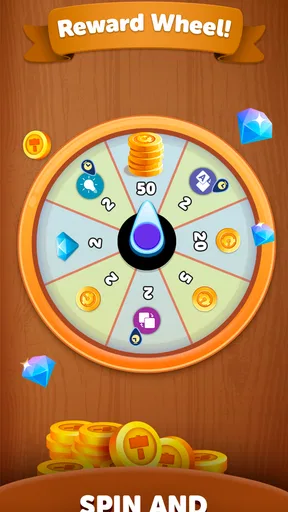
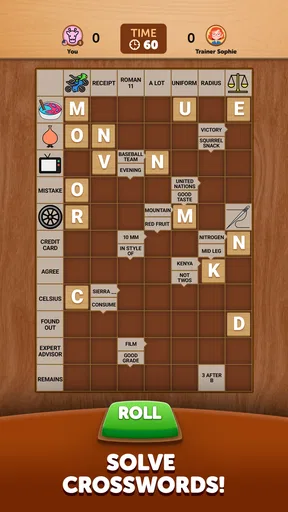
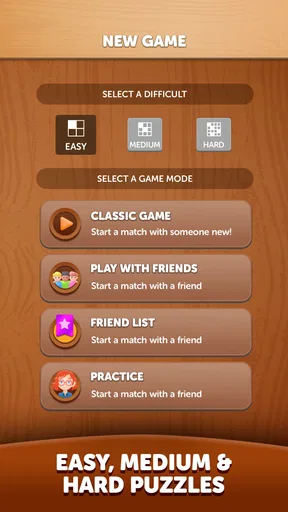
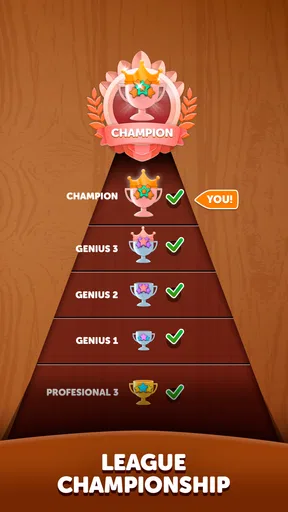
Our Review of Arrow Crosswords
 Analysis by Appyee
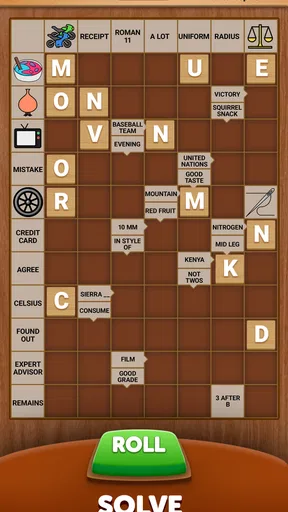
I like a word game that can fit into the small gaps in a day, but still gives me something to think about. Arrow Crosswords is built around arrow-style clues placed inside the grid, so the puzzle itself is the main focus rather than a separate clue list. That layout gives it a different feel from the familiar newspaper crossword, and it is the first thing I would show someone who wants to understand how this game plays.
A shared puzzle, with room for different styles
In a household, this kind of game can work well as a casual shared activity without requiring everyone to play at the same pace. One person can start a puzzle during a quiet moment, then hand the device to someone else to tackle a clue or inspect a crossing answer. The grid gives both players the same visual reference, which makes it easier to talk through a tricky entry than it can be when clues and answers are separated.
I would treat that as informal turn-taking, not as a built-in multiplayer arrangement. The useful household habit is to agree who is currently solving and avoid changing answers mid-turn. That small bit of coordination keeps a shared puzzle enjoyable, especially when one player likes to guess quickly and another prefers to work through every crossing first.
What I would check before sharing a device
Before passing any game between people, I like to check whether the current puzzle is in progress and whether someone wants to finish it themselves. A crossword can feel personal once a solver has formed a plan, and an eager helper can accidentally spoil the satisfaction by filling in an answer. For shared use, I would make a simple rule: ask before entering letters, and let the person who started the puzzle choose whether hints or help are welcome.
This is also a sensible way to keep expectations clear when more than one person uses the same phone or tablet. I would not assume that a shared device automatically means separate progress or personal boundaries; instead, make sure each person knows whose session they are using. That is practical advice for any game played on one device, rather than a claim about a particular account feature.
Age, spending, and household trust
The game is rated for Everyone, which makes its content suitable for a broad audience, but I still think adults should set ordinary boundaries when children use a device. The game is free to download, and it offers optional in-app purchases ranging from $0.99 to $99.99 per item. I would review purchase settings on the device and explain that free access does not mean every optional item is free.
That distinction matters more in a family setting than it does during a solo session. A child may see a purchase prompt as part of the game rather than a real transaction, so I would keep buying decisions with the adult account holder. I also would not promise that the game provides family controls or separate child profiles; the reliable approach is to use the device’s own purchase safeguards and agree on who may make changes.
The Puzzle Experience
First things first, let’s talk about the gameplay. Arrow Crosswords takes the traditional crossword format and spices it up with a unique twist. Instead of the usual numbered boxes and a list of clues off to the side, the clues here are embedded directly into the grid. Yep, no more toggling back and forth; everything you need is right in front of you.
This format feels super intuitive and reduces the mental gymnastics of flipping between clues and the grid. It’s like having the puzzle whisper the answers to you as you go. It might take a puzzle or two to get used to, but once you do, it’s incredibly satisfying.
User Interface & Design
The app’s design is sleek and minimalistic, which I personally love. It's all about the puzzles here, without any unnecessary clutter. The clean interface allows you to focus on unraveling the clues without distractions. The color palette is easy on the eyes, and the touch controls are as smooth as butter. Navigating through the app feels like a breeze.
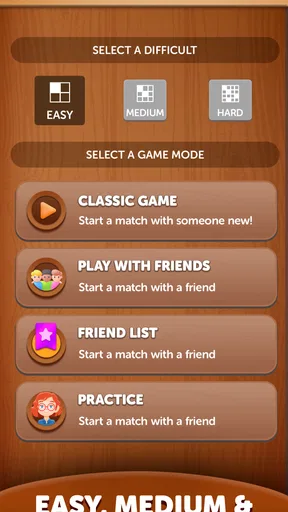
One neat feature is the ability to customize the difficulty level. Whether you want a quick brain tease or a real head-scratcher, there’s something for everyone. You can adjust the settings to match your mood and skill level, which keeps things fresh and engaging.
Content Variety
Let’s talk about variety. The app offers a vast collection of puzzles that span different themes and topics. From pop culture references to historical trivia, you’ll find a delightful mix that keeps every session interesting. The puzzles update regularly, so you’re always in for something new and exciting.
For those who love a challenge, there are timed puzzles that add a thrilling layer of pressure. If you’re competitive like me, you’ll get a real kick out of beating the clock or improving your previous times. It’s a great way to keep your mind sharp and your crossword skills honed.
Making the format work for you
Arrow-style grids reward a slightly different solving rhythm from a conventional crossword. I would scan the visible clues first, then enter the answers I feel confident about and use crossing letters to narrow down the uncertain ones. Because the clue sits in the grid, it is easy to focus on one small area; the trade-off is that a crowded section can demand more visual attention than a numbered clue list.
A useful approach is to avoid forcing a guess just because a clue looks familiar. If an answer does not fit the crossing letters, leave it for a moment and move to another part of the grid. This keeps a single uncertain word from steering the rest of the puzzle in the wrong direction. It also makes the game easier to share: another person can contribute by checking crossings rather than taking over the whole board.
The difficulty setting is worth using deliberately. I would pick an easier level when I want a short, low-pressure break, and raise the challenge when I have time to think carefully. Timed play changes the mood, so I would keep it for sessions when speed is part of the fun. If I am solving with someone else, I would leave the clock out of the conversation unless both of us enjoy competing; otherwise it can turn a cooperative puzzle into a race.
Where it sits among word games
Compared with a standard crossword app that presents a clue list beside numbered squares, this game puts the clues into the board and keeps the solving process visually compact. That is a real advantage for players who like to see the clue and its answer area together. It is less compelling for someone who relies on the traditional numbering system or wants the familiar feel of a newspaper puzzle. In that case, a conventional crossword is likely the more comfortable choice.
It also differs from word-search games, which mainly ask you to spot words already hidden in a grid. Here, the central task is interpreting clues and fitting answers together, so vocabulary and general knowledge matter more than visual scanning alone. If you want a word game that asks for quick pattern spotting with little clue-solving, a word search may suit you better. I see this as a more thoughtful option for a short mental workout, not a replacement for every kind of word puzzle.
FunCraft Games is the developer, and the game is free to install. It has a 4.7 average from around 5.7K ratings, with over 100K installs, which suggests that many players have found the format worth trying. Those figures help set expectations, but they do not tell me whether its particular clue style will suit you; the best test is whether you enjoy solving directly from the grid.
Community & Social Features
What’s a game without a little social interaction, right? Arrow Crosswords includes some nifty social features that allow you to connect with fellow crossword enthusiasts. You can share your completed puzzles, challenge friends to beat your time, or simply engage in some friendly banter about tricky clues.
This sense of community adds a whole new dimension to the app, making it more than just a solitary experience. It’s like joining a club where everyone speaks the language of crosswords.
Everyday use, and who should pass
I can imagine opening a puzzle while waiting for a meal to finish or during a quiet coffee break, solving a few accessible entries and leaving the harder crossings for later. That is a better fit than starting a timed challenge when I know I will be interrupted. For a family, it can become a brief shared activity after dinner: one person reads a clue, another suggests an answer, and the device stays with whoever is entering the letters.
The game is a good fit for people who enjoy clue-based word puzzles, want a different layout from the standard crossword, and like having difficulty options. I would be more cautious about recommending it to someone who dislikes compact grids, wants a purely offline activity, or is looking for a deep social competition experience. I would also skip it if I wanted a broad collection of unrelated game modes rather than a focused crossword format.
It launched on May 17, 2024, and the current version is 2.0.24355. On Android, it requires version 7.0 or later. Those details make it straightforward to check basic compatibility before installing; the practical question after that is whether the arrow layout feels clear on your screen and comfortable to tap. If you are unsure, try a puzzle at a relaxed pace before deciding whether to use the timed option or share it with someone else.
Final Thoughts
So, what’s the verdict? Arrow Crosswords is a gem for anyone who enjoys a good puzzle. It combines the best elements of traditional crosswords with innovative features that make solving them even more enjoyable. The intuitive design, coupled with a vast array of puzzles, ensures that you’ll never get bored.
If you’re looking for a brainy app that’s both challenging and fun, give Arrow Crosswords a try. Whether you’re on a quick coffee break or winding down after a long day, these crosswords are a perfect companion. Happy puzzling!
My household verdict
For shared use, I like the idea of this as a take-turns puzzle rather than a game everyone needs to play at once. Its grid-centered clues make it easy to point to a specific problem and discuss possible answers, while difficulty options give different confidence levels a way in. The main household friction is not the puzzle itself but agreeing who gets to make the next move, and keeping optional purchases under adult control.
My recommendation is simple: choose it if the arrow-grid format sounds appealing and you want a focused word game that can work for solo breaks or informal collaboration. Choose a traditional crossword app if you prefer numbered clues, or another kind of word game if you want less interpretation and more rapid play. I find this one most enjoyable when I have a few calm minutes, a willingness to reconsider guesses, and no pressure to finish at someone else’s pace.
Verdict
Strengths of Arrow Crosswords
- User-friendly interface for easy navigation.
- Variety of puzzle difficulty levels.
- Offline play mode available.
- Regular updates with new puzzles.
- Hints are available for tough clues.
Limitations of Arrow Crosswords
- Ads can be intrusive during play.
- Some puzzles may repeat over time.
- Limited free puzzles without subscription.
- Occasional lag on older devices.
- No multiplayer or social features.
Other Releases by FunCraft Games
View All


Similar Picks in This Category
View All
Word Search - Word Puzzle Game
Bluetile4.8

Word Search Quest - Puzzles
Blackout Lab4.8

CodyCross: Crossword Puzzles
Fanatee, Inc.4.7

Words of Wonders: Crossword
Fugo Games4.9

Wordscapes: Word puzzle game
PeopleFun4.7

Word Search Explorer
PlaySimple Games4.9
Frequently Asked Questions
What is Arrow Crosswords, and how does it differ from traditional crossword puzzles?
Arrow Crosswords is a unique twist on the classic crossword puzzle, using arrows to indicate where the answers go. Unlike traditional crosswords with numbered clues, this app provides arrows within the grid itself, offering a new and engaging challenge for puzzle enthusiasts. It's ideal for those looking to spice up their puzzle-solving routine.
Is Arrow Crosswords suitable for beginners, or is it more for experienced puzzle solvers?
Arrow Crosswords caters to all skill levels, from beginners to seasoned solvers. The app features puzzles of varying difficulty, allowing users to start with simpler grids and gradually move to more complex ones. This progressive challenge makes it perfect for anyone looking to improve their puzzle-solving skills.
Does Arrow Crosswords require an internet connection to play?
Arrow Crosswords can be enjoyed offline, making it a great option for on-the-go entertainment without worrying about Wi-Fi or data usage. However, connecting to the internet may be necessary for downloading new puzzles or accessing additional features, such as hints or leaderboard updates.
Are there any in-app purchases or ads in Arrow Crosswords?
Arrow Crosswords is free to download and play, but it may contain in-app purchases for additional features, such as extra hints or premium puzzle packs. The app might also display ads, though users can opt for a premium version to enjoy an ad-free experience and unlock more content.
Can I track my progress and compete with friends in Arrow Crosswords?
Yes, Arrow Crosswords includes features that allow you to track your progress and compete with friends. The app often integrates with social media or gaming platforms, enabling you to share scores and achievements. This social aspect adds a competitive edge and enhances the overall experience.
Play our best games!


